Skip to the content

Private preview: sign-up is not open yet. Join the waitlist

tennet

Build apps

Desktop app

The same screens on Windows, macOS and Linux, on Tennet or your own server.
Coming
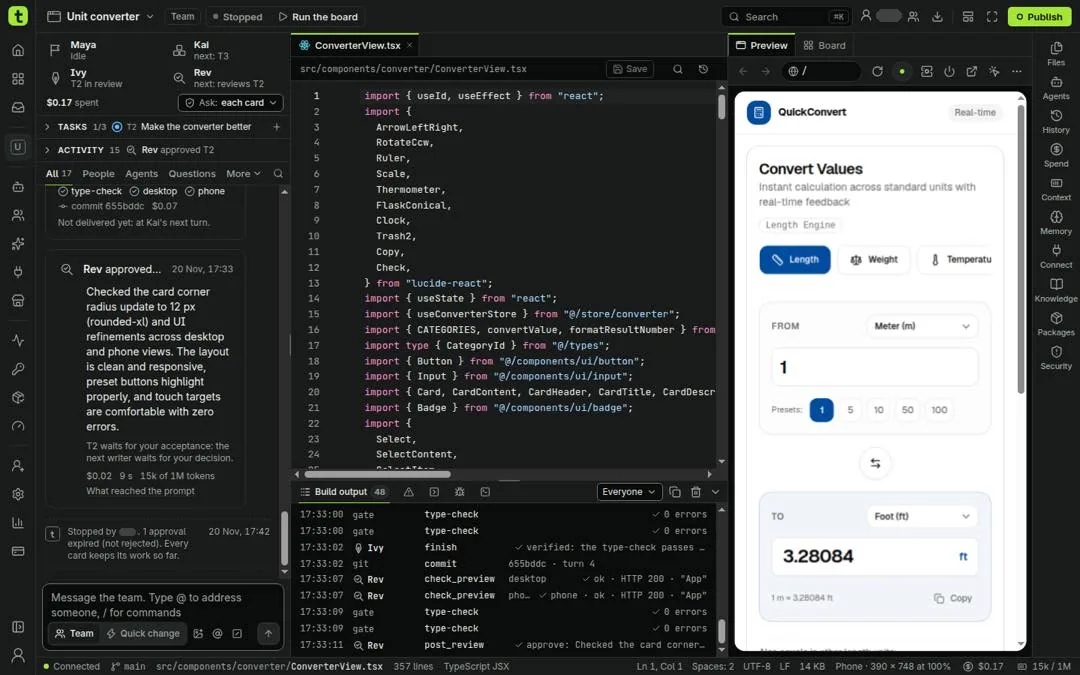
The Theatre inside the desktop app, captured during the parity gate: under the Ask each card policy, card T2 waits for the person's acceptance.
The desktop app, from the packaged build's parity gate. Screenshot from Tennet's own browser tests, Nov 25-27, 2026 (round 8 build, the console's previous look); names masked.
Desktop app · Theatre
The Theatre inside the desktop app, captured during the parity gate: under the Ask each card policy, card T2 waits for the person's acceptance.
steps of Quick's journey on the packaged Linux build; native checks 23 of 23
one packaged build, Nov 25, 2026
pages with 0 differing pixels between the desktop app and a plain window, twice
28 pages, Nov 27, 2026

F-71

A thin client of a Tennet server

An Electron client with the same screens as the web app. It can open Tennet or a company's own server.

A partition per server

Each server gets its own cookie partition.

Links open in your browser

Links off the server open in the default browser.

Sandboxed pages

Pages run sandboxed with no Node access.

Where is your Tennet?

A first start asks which server to open; a packaged build's default address today is this marketing site.

Native checks

Deep links, downloads, notifications, menus, offline and Settings screens.

The parity gate

28 pages in light and dark, compared pixel by pixel with plain windows of the same engine.

Measured

Proven equal to the web, pixel by pixel

On the packaged Linux build, Quick build's whole journey passed and every native check passed. The parity gate passed two whole runs at round 8 with its planted 1-pixel faults failing it.
  • 8 of 8 steps of Quick's journey on the packaged Linux build; native checks 23 of 23 · Nov 25, 2026
  • 28 of 28 pages with 0 differing pixels between the desktop app and a plain window, twice · Nov 27, 2026
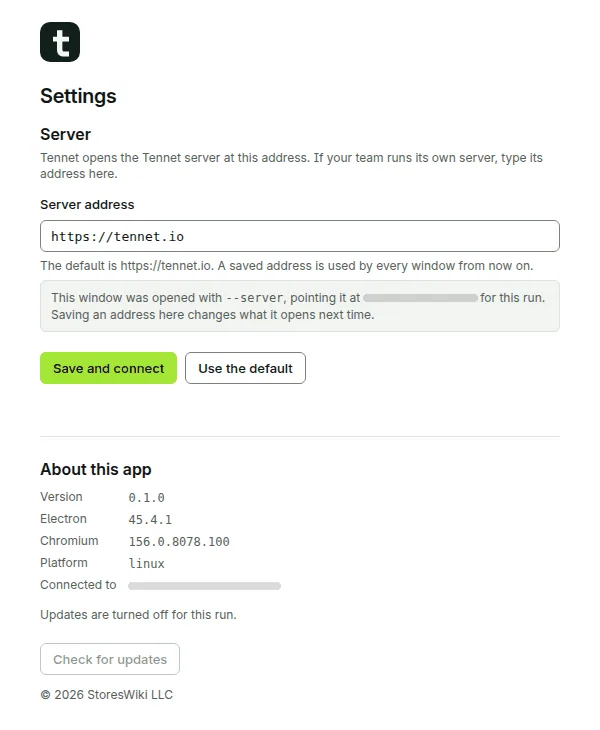
The desktop app's Settings: the server it opens, tennet.io by default or a company's own server, and the app's versions.
The desktop app's server setting. Screenshot from Tennet's own browser tests, Nov 25-27, 2026 (round 8 build, the console's previous look); names masked.
Desktop app · Settings
The desktop app's Settings: the server it opens, tennet.io by default or a company's own server, and the app's versions.

Unsigned builds exist; downloads do not

These builds were made and tested. They are not offered for download until they are signed.

Linux
AppImage 120.5 MB, .deb 97.0 MB
Windows
116.2 MB
macOS
Apple silicon 112.5 MB, Intel 116.4 MB

Questions people ask

Not answered here? Write to [email protected].

Can I download the desktop app?

Not yet. Signed and notarized installers need the company's Apple and Windows signing identities, which are coming. There is no public download page. Join the waitlist to hear when it opens.

Will it work with our own Tennet server?

Yes. It opens Tennet or a company's own server, and each server gets its own cookie partition. On first start it asks “Where is your Tennet?”.

Is it the same as the web app?

Yes: a thin client with the same screens. A parity gate shoots 28 pages, light and dark, in the app and in plain windows of the same engine and compares them pixel by pixel; planted 1-pixel faults must fail it.

Related

The Theatre

The room the desktop app shows.

On-premise

Point the app at your own Tennet server.

What's new

When installers are signed, it will say so here.

Join the waitlist

Tennet is in private preview. Leave your e-mail and we'll write when sign-up opens.

Contact us about anything else.

We keep your e-mail address, IP address and browser's user agent to run the waitlist. Privacy policy.

Facts on this page as of Nov 27, 2026. How we measure